Features
Everything happens on the phone. Here is what it does there.
SnapBill is a single-purpose tool: capture an expense bill, read it, file it, hand it over. Each part below is in the shipped app today. Planned work is on the roadmap, not here.
Capture
- Camera firstThe app opens on the camera with a corner-bracket guide frame. One tap, and the bill is on its way to Review.
- Five checks, under half a second, never blockingAfter the shutter the photo is checked for blur, glare over the text, edges cut off, too little readable text, and no digits at all. Each failure names itself (“Photo is blurry — retake?”, “Glare — tilt slightly”, “Amount not visible — move closer”) and offers Retake or Use anyway. You decide; the app only advises.
- Sideways photos straighten themselvesShoot a bill lying across the table and the app rotates it upright before reading.
- Long bills are read in sectionsA supermarket strip longer than the frame is split into bands automatically, read band by band, and stitched back into one set of fields.
- Multi-page billsHotel folios and multi-page invoices: tap + Add page in Review to photograph the next page. Fields you have not touched are filled from the new page; fields you have edited are left alone.
- Import a photo or PDFA bill that arrived by mail or WhatsApp can be imported through the system picker. PDF invoices are rendered page by page and read the same way as a photo. The stored file stays the original PDF.
- Continuous captureWorking through a stack? After the third bill in ten minutes the app offers to return straight to the camera after every save. Change it any time in Settings.
Reading
All reading runs on the device. The phone’s own text recognition turns the photo into text, and SnapBill’s rules pick the fields out of it. Nothing is sent anywhere.
| Field | What it reads |
|---|---|
| Amount | The amount paid: net after discount, the line that reconciles with the tax breakup. Never the pre-discount gross. |
| Date | Day-first and month-first formats, two- and four-digit years. A date that cannot be read is left empty and asks for a tap, never silently replaced with today. |
| Merchant and address | The printed name, not the logo; the address lines beneath it, ending at the PIN code. |
| Invoice number | Invoice / bill / receipt / order number, in that order of preference. |
| Tax number | GSTIN on Indian bills, validated by its check digit. TRN or VAT number on overseas bills. |
| Tax breakup | CGST / SGST / IGST on GST bills. A single tax amount and rate on VAT bills. |
| Currency | Read off the bill: ₹, AED, USD, GBP and others. When unsure, it defaults to the last currency you saved, not blindly to INR. |
| Category | Looked up from your own past corrections first, then keyword rules (fuel stations → Fuel, restaurants and cafés → Meals, and so on). |
Confidence, shown honestly. A field the app is confident about is filled normally. A field it is unsure of gets an amber border. Amber informs, it does not block: correct the field or save it as read. The only things that refuse to save are actually invalid data, such as an empty amount or a date in the future, each with a message naming the problem.
What SnapBill read. Long-press the bill photo in Review to see the exact text the phone recognised. Useful when a read is wrong, and it is what “Report a wrong read” attaches, with your permission.
Filing
- Month sections with subtotalsBills land in their month, newest first, with a running subtotal, a thumbnail, merchant, amount and a Pending or Submitted chip. Search by merchant or amount; filter by status.
- InsightsMonthly totals, spend by category and by payment type, the recent trend, and a clear count of what is still pending before you export.
- Your categories, your payment typesBoth lists are editable in Settings. Add a card, a cost head or a client name, and it is there as a chip on the next bill. Personal payment types can be marked as non-claim, so a bill you keep for yourself never shows as “Pending”.
- It learnsCorrect a merchant’s category once and the app remembers. The more you correct, the less you correct.
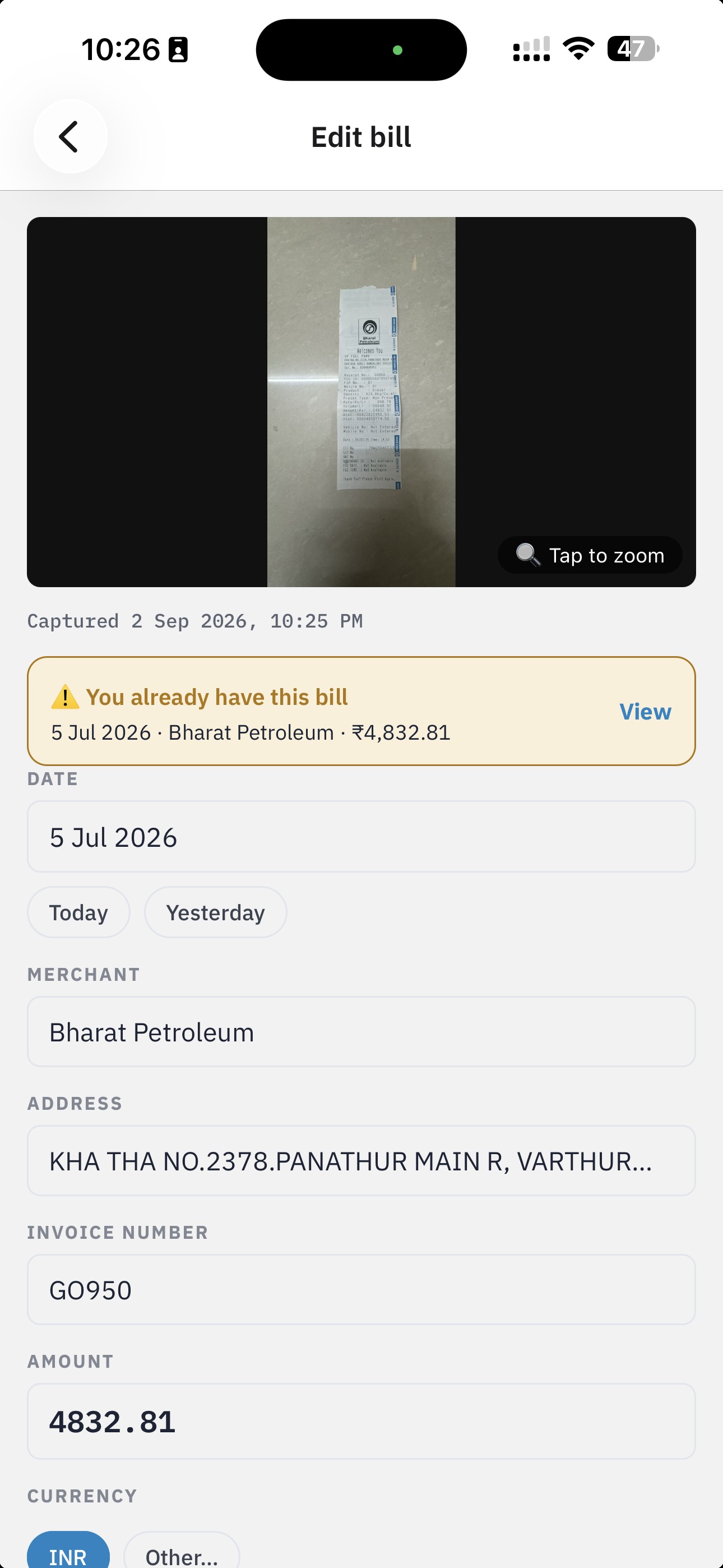
- Duplicates, warned not blockedPhotograph the same bill twice and the app says when you first captured it. A bill with the same invoice number and merchant, or the same date, amount and merchant, is flagged with an amber banner in Review before you save. The default is to warn; a Block repeats setting makes near-certain duplicates refuse to save.
- Travel and multiple currenciesSet a home currency in Settings. Bills in another currency ask for the exchange rate, entered by hand from your card statement. The app never fetches a rate online. Every total then shows the converted figure, labelled an estimate, with per-currency subtotals beside it and a count of bills that could not be converted. Nothing is silently dropped or silently added.
Handing over
Export any range. Quick picks for This month and Last month, or a custom range. The preview shows the count and total before you generate.
SnapBill_2026-08-01_2026-08-31.zip
├── manifest.json        version, date range, count, total, every record, image hashes
├── Summary.xlsx         one row per bill, plus a Totals sheet
└── bills/
    ├── company-cc/
    │   └── 2026-08-14_Indiana-Delights_30.10_1.jpg
    └── personal/
        └── …
- Share it anywhereThe ZIP goes out through the phone’s own share sheet: mail, chat, drive, AirDrop, whatever is installed.
- Export is not SubmittedGenerating a package marks nothing. Mark as Submitted is a separate tap after you have actually sent it, so Pending always means “not yet handed over”.
- Batch historyEvery package you generated is listed under Export with its range, count and total, and can be re-shared or deleted.
- Smaller packagesArchive copies of images are downscaled for the ZIP; the full-resolution original stays on the phone.
Privacy and control
- No account, no sign-in, no server. The app has no backend to talk to.
- No analytics, no advertising SDK, no tracking.
- Everything is stored in the app’s private storage on the device.
- Your data panel in Settings shows exactly what is on the phone: how many bills, how many MB, and the reminder that uninstalling deletes it.
- App lock. An optional PIN required to open the app. Off by default. There is no recovery if it is forgotten, and the app says so before you turn it on.
- Feedback you choose to send. Settings → Feedback & support writes an email on the device and hands it to your own mail app. Bill details and the photo are attached only if you switch them on, and you see the exact text before sending.
Platforms
- Android and later.
- iPhone, iOS 16 and later.
- Works with zero network access. Forever.